Chocolate Hills Map
- 14-12-2025, 11:29
- 448
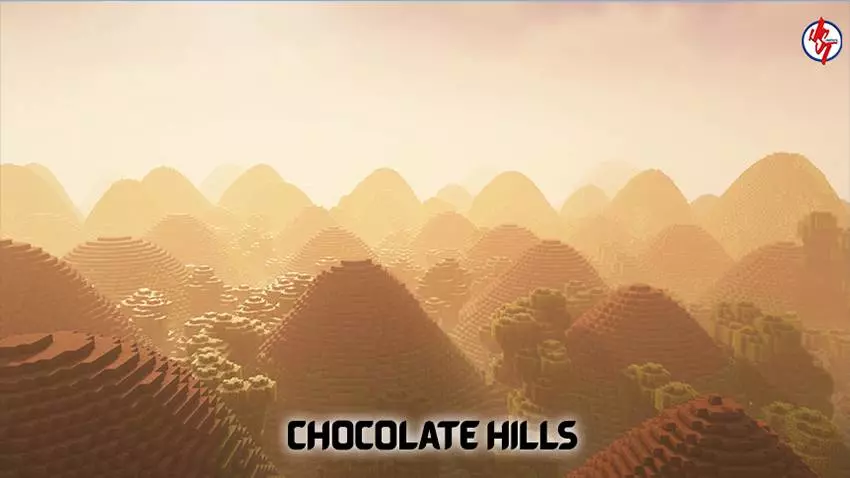
Chocolate Hills Map is built around one of the Philippines’ most iconic natural sights: a huge field of rounded hills in Bohol that look green in wet season and turn brown during the dry season, which is where the “Chocolate Hills� name comes from. The whole point here is the terrain itself, so you’re not loading in for dungeons or gimmicks—you’re loading in for a recognizable landscape you can run through, build on, and use as a backdrop.
In Minecraft Bedrock, this kind of map is perfect for explorers who like wide-open views and for builders who want a terrain base that already looks special before you place a single block. You can set up a hilltop camp, carve paths that snake between the mounds, or claim one peak as a lookout spot for your survival world. It also plays great on Realms because everyone can pick their own hill and spread out without stepping on each other’s builds.
Chocolate Hills Map is basically a terrain showcase that doubles as a build-friendly playground, especially if you want that “endless hills� vibe for screenshots, roleplay, or a scenic long-term base.
Installation instructions:
Android: use the file manager, go to the directory with the downloaded map file and open it.
Windows 10: open the folder with the downloaded file and activate the mcworld file.
IOS: after downloading, your mobile device will prompt you to install the map.
Comments (0)